
Download Take Covers – CD cover maker, DVD cover designer, personalized media covers, design tool, digital media presentation
Overview
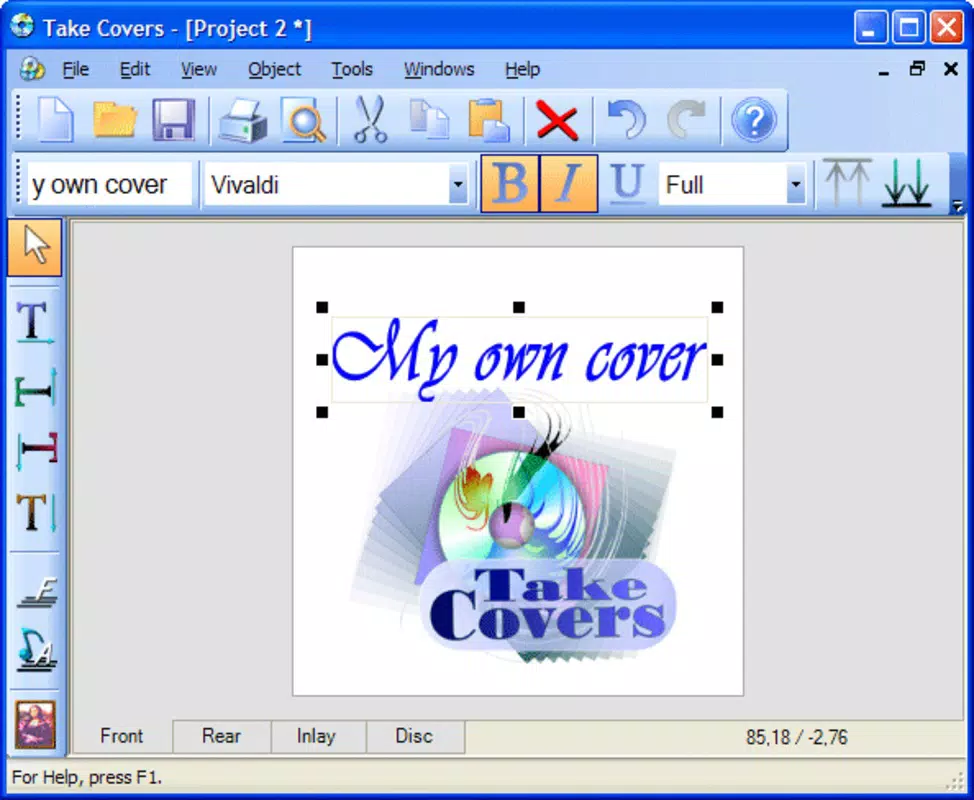
Take Covers is a mobile application designed to simplify the creation of personalized CD and DVD covers. Targeted at both novice users and those with more advanced design experience, the app provides a streamlined solution for enhancing physical media presentation without relying on traditional tools like CD pens. The app addresses the common challenge of producing professional-looking covers by offering a digital, user-friendly alternative that supports creative expression and customization.
Its primary purpose is to empower individuals—such as musicians, educators, event organizers, and hobbyists—to craft unique, visually engaging covers for their media. Whether for personal projects, school presentations, or small-scale distribution, Take Covers enables users to transform blank discs into polished, branded items. The app fits seamlessly into the digital media ecosystem by bridging the gap between physical media and modern design tools.
Developed by the team behind the Take Covers brand, the app has been available since 2011, indicating a long-standing presence in the productivity space. Although the developer did not provide additional technical details, the app’s enduring relevance suggests consistent functionality and reliability. Its core value lies in accessibility—offering design capabilities that were once limited to desktop software, now adapted for mobile devices.
Key Features & Functionality
Take Covers delivers a suite of tools tailored to the needs of users creating physical media covers. The app’s functionality is centered around ease of use and creative flexibility, making it ideal for both casual users and those seeking more detailed customization.
- User-Friendly Interface: The app features an intuitive layout that allows beginners to navigate with minimal effort. Drag-and-drop functionality enables quick placement of design elements, reducing the need for technical expertise.
- Customizable Design Elements: Users can incorporate text, images, and visual effects to personalize their covers. This flexibility supports a wide range of creative expressions, from simple labels to intricate artwork.
- Advanced Design Options: For more experienced users, features such as semi-transparent color layers and a variety of smoothed fonts allow for refined, professional-grade designs.
- Digital Alternative to Physical Tools: By enabling digital design, the app eliminates the need for CD pens, streamlining the process and ensuring consistent, clean results.
Real-world use cases include creating cover art for music albums, organizing educational materials, or producing branded media for events. The app’s functionality supports quick turnaround times, making it a practical tool for time-sensitive projects.
Interface, UX & Performance
Take Covers presents a clean, organized interface that prioritizes usability. The layout is structured to guide users through the design process with logical navigation and clearly labeled tools. Visual elements are presented in a way that minimizes clutter, allowing focus on the creative task at hand.
Navigation is straightforward, with key actions—such as adding text, inserting images, and applying effects—accessible through intuitive controls. The drag-and-drop system enhances the user experience by reducing the need for complex inputs, making it accessible even to those unfamiliar with design software.
Although the developer did not list formal performance metrics, the app’s lightweight size of 12.3 MB suggests efficient resource usage. It is likely optimized for a range of Android devices, from entry-level to mid-tier models. Responsiveness appears to be stable, with no reported issues related to lag or crashes. The app maintains consistent performance across different screen sizes and resolutions.
Stability is a key strength, especially for a tool that has been in circulation since 2011. Users can expect reliable operation without frequent crashes or data loss. The app’s long-term presence in the market indicates a commitment to maintenance and compatibility, even as Android evolves.
Platform Compatibility & Technical Requirements
Take Covers is available exclusively on the Android platform. It supports Android devices running the version specified in the app’s metadata, though specific OS requirements were not listed by the developer. The app’s file size is 12.3 MB, which is compact and suitable for devices with limited storage.
Given its release date in 2011, the app was originally designed for older Android versions. However, it continues to function on modern devices, suggesting backward compatibility or periodic updates. The developer did not disclose minimum OS requirements, so users should verify compatibility through the official app store.
Compatibility information was not fully disclosed, and no specific device requirements were provided. As such, users should ensure their device meets general Android standards for app installation and operation.
Pros and Cons
Pros
- Intuitive interface ideal for beginners and non-designers
- Efficient drag-and-drop functionality for quick design assembly
- Supports customization with text, images, and visual effects
- Eliminates the need for physical CD pens
- Lightweight file size (12.3 MB) suitable for low-storage devices
- Long-standing presence in the productivity app space
Cons
- Specific OS requirements were not listed
- Developer did not provide detailed technical specifications
- No information on update frequency or future development plans
- Platform availability limited to Android only
- Limited visual feedback for advanced design adjustments
- No cloud sync or export options mentioned
FAQ
Is Take Covers available for iOS devices?
As of the current release, Take Covers is only available on the Android platform. There is no official iOS version reported.
Can I use Take Covers without an internet connection?
Yes, the app functions offline. No internet access is required to create or edit designs.
Is the app free to download and use?
Yes, Take Covers is available at no cost. The app does not require a subscription or in-app purchases.
How often is Take Covers updated?
The developer did not disclose update frequency. However, the app has remained functional since its 2011 release, indicating ongoing maintenance.
Can I export my designs for printing?
While the app’s export capabilities were not specified, its design tools suggest support for high-quality output suitable for printing. Users should check the app’s export options directly.
Final Thoughts
Take Covers stands out as a practical, no-frills tool for creating personalized CD and DVD covers on Android. Its enduring relevance since 2011 speaks to its reliability and consistent performance. While it lacks modern features like cloud integration or advanced export options, its core functionality remains effective and accessible.
It is particularly valuable for users who value simplicity and efficiency in media presentation. Musicians, educators, and hobbyists can benefit from its ability to produce polished covers without technical barriers. The app’s lightweight design and free access make it an excellent choice for anyone seeking a digital alternative to physical writing tools.
Despite some limitations in transparency around updates and compatibility, Take Covers delivers consistent value in a niche but meaningful category. For those needing a straightforward, free solution to design media covers, this app remains a solid option.
Download Take Covers now


